
AI Co-Worker Guide:Lead Hybrid Workflows in 2026
Most teams are still using AI like a fancy autocomplete. Sure, you paste a prompt, grab the output, and move on. That approach works fine for drafting quick emails. However, it completely falls apart when you’re running complex, multi-step operations. If you’ve ever wasted hours debugging a system that “forgot” the last three steps, you already know the struggle. Ultimately, the problem isn’t the technology itself. Rather, it’s the framing. In fact, you’re treating it like a vending machine when you actually need an AI Co-Worker.
This isn’t about replacing your staff. Instead, it’s about giving them a reliable partner that remembers context, follows clear boundaries, and knows exactly when to hand things back to a human.
What Is an AI Co-Worker?
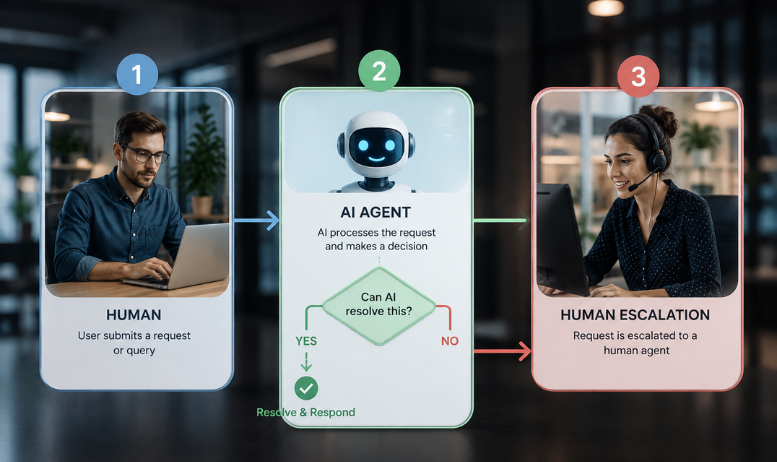
Specifically, an AI Co-Worker is a role-based, context-aware system designed to operate alongside human teams rather than replace them. Unlike generic chatbots or one-off prompting tools, it maintains session memory, executes predefined workflow steps, and escalates ambiguous tasks based on configurable guardrails. Consequently, it turns fragmented AI usage into structured AI workflow automation that scales seamlessly with your business.
Why the “Tool” Mentality Is Breaking Down
For years, we’ve treated AI like a utility. Typically, you open the tab, run the task, and close it. That workflow is perfectly fine for isolated work. On the other hand, it becomes highly inefficient for anything that requires continuity.
When you shift to AI as a Co-Worker, the math changes entirely. Because you’re no longer prompting from scratch every time, you can assign it a defined slice of work. As a result, it holds the context. Furthermore, it tracks the state. Meanwhile, it runs the steps without you hovering over every click.
Think about it. If your system has to relearn the project history every morning, you’re still stuck in the tool phase. Therefore, the real efficiency jump happens only when the AI operates across sessions, handles the heavy lifting, and leaves you free to actually make decisions.
AI Co-Worker in Action: Real-World Workflows
In practice, this isn’t theory. We’ve watched teams quietly roll out role-based agents precisely because the time savings are impossible to ignore. Consequently, here’s how it plays out across different departments:
- Customer Support: The AI Co-Worker handles first-line triage, sentiment scanning, and order history lookup. Accordingly, when frustration signals spike or customer lifetime value crosses a specific threshold, it seamlessly hands off to a human agent. As a direct result, teams achieve 42% faster resolution times alongside higher CSAT scores.
- Data Engineering: The system performs real-time anomaly detection, pipeline monitoring, and generates plain-English root-cause reports. Furthermore, when ambiguous upstream changes occur or human validation is required, it pauses and alerts the engineering team. Therefore, mean time to recovery drops from hours to mere minutes.
- Content & Compliance: The agent manages draft routing, version control, and policy cross-checking. Additionally, if legal review becomes necessary or brand voice deviations are detected, it escalates immediately to a compliance specialist. Consequently, organizations see a 30% reduction in revision cycles.
For instance, one e-commerce client was drowning in ticket volume. Rather than routing everything to a human, they deployed an AI agent scoped to first-line triage. Naturally, the agent handled routine questions automatically. However, here’s the catch: when frustration signals spiked or lifetime value crossed a certain threshold, it instantly handed off to a senior rep with a full summary. As a direct result, that client cut average resolution time by 42% and actually improved CSAT scores. Ultimately, the humans stopped playing detective. Instead, they started saving accounts.
Similarly, on the engineering side, one analytics team was wasting Friday afternoons chasing red dashboards. To solve this, they put a data quality agent on the pipeline instead. Consequently, the agent monitors upstream changes and correlates anomalies in real time. By Monday morning, it posts a plain-English breakdown of what broke, where, and why. Because of this, the lead engineer doesn’t spend hours guessing. Rather, they just validate the fix and push it. As a result, mean time to recovery dropped from hours to minutes.
How to Set Boundaries for AI as a Co-Worker
Clearly, you wouldn’t give a new hire full admin access on day one. Likewise, don’t do it with AI either.
As we track where AI trends 2026 are heading, the smartest teams aren’t chasing raw capability. Instead, they’re chasing reliability. Therefore, that means drawing hard lines. Specifically, your agent needs three non-negotiables:
- Clear Scope: First, define exactly what it owns, what it can suggest, and what must be escalated.
- Strict Permissions: Second, apply least-privilege access. Moreover, if it runs scripts or modifies records, auditable logs are mandatory.
- Hard Escalation Triggers: Finally, when confidence dips or context becomes ambiguous, it must pause and alert a human.
Consequently, skip these AI agent guardrails, and you’re not building a coworker. Rather, you’re building a liability. Therefore, track accuracy, latency, and failure rates from day one. After all, if you can’t trace why it made a decision, you can’t fix it when it goes wrong.
Where Teams Usually Trip Up (FAQ)
Additionally, here are common questions teams ask before implementation:
Q: Should I automate high-stakes workflows immediately?
A: Absolutely not. Start with recommendations-only mode. Instead, measure output quality for 2–4 weeks before granting execution permissions.
Q: How do I track AI agent decision paths?
A: Fundamentally, treat the agent like a production service. Consequently, enable full logging, audit trails, and version control for every action.
Q: Isn’t a clever prompt enough for AI workflow automation?
A: Definitely not. Prompts aren’t architecture. Rather, sustainable automation requires state management, permission layers, and evaluation frameworks.
Q: What happens if escalation rules are vague?
A: Unfortunately, ambiguity creates silent failures. Therefore, document handoff rules, stress-test them in sandbox environments, and iterate continuously.
Why Humans Actually Become More Valuable
Here’s where it gets interesting. In fact, the better the AI gets, the more your human skills matter.
Ultimately, AI trends 2026 aren’t about replacing judgment. Instead, they’re about removing the grind so you can actually use it. Because the system handles speed and scale, you can double down on stakeholder alignment, ethical calls, and creative problem-solving.
Historically, the calculator didn’t put accountants out of work. Rather, it forced them to stop doing arithmetic and start advising clients. Similarly, the same rule applies here. Consequently, the teams that win won’t be fighting the AI. Instead, they’ll be directing it.
Your Next Move: Step-by-Step Rollout Plan
To get started, follow this proven rollout plan:
- Pick one high-volume workflow: Initially, target processes that consume 10+ hours/week of repetitive tasks.
- Map the steps: Next, identify where AI can own execution versus where human approval remains mandatory.
- Define escalation triggers: Simultaneously, establish clear confidence thresholds, error rates, and sentiment flags.
- Run a 2-week sandbox test: During this phase, keep recommendation-only mode active while enabling full logging.
- Measure what moves the needle: Afterward, track resolution time, error rate, and team capacity freed.
- Scale what works: Finally, document successful playbooks and train operators on standardized handoff protocols.
For deeper technical guidance, explore our 2026 AI trends report and our complete AI agent guardrails framework.
Final Takeaway
In summary, integrating an AI Co-Worker means your team can focus on strategy while the system handles the repetition. Because the hybrid teams building these workflows now will set the pace for the rest of the decade, you must act deliberately. Start small. Guardrail early. Measure relentlessly. Ultimately, scale with confidence.