
Why Your App Idea Is Failing (And How to Fix It)
Here’s the thing. Most app ideas don’t fail because they’re bad. In fact, many have great potential. However, they often fail because the gap between what you think is possible and what actually works is just too wide. First, you come up with a feature. Then, it becomes clear that you need a team of developers. Suddenly, you’re watching your budget drain. Or worse, you might try to learn coding from scratch, hit your first bug, and quietly give up. If that sounds familiar, don’t worry you’re not alone.
The problem isn’t your idea. Rather, it’s the build process.
Low-Code Isn’t Magic. It’s Just Smarter.
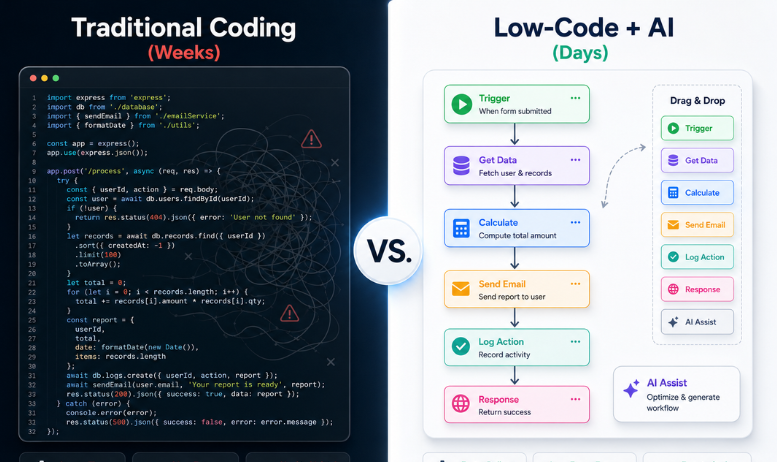
Low-code development makes things easier. But let’s be clear: it’s not magic. Think of it like using building blocks where someone else has already done the heavy lifting. You move pieces around, connect them, and configure settings. That’s it.
People often confuse no-code and low-code. To clarify, here’s the key difference:
- No-code is great for simple stuff. A landing page? Sure. Basic email automation? Easy. However, the second you need a custom database or complex user roles, you hit a wall.
- On the other hand, low-code lets you build most of your app visually. Then, if you hit a tricky edge case, you can drop in a bit of code. Consequently, you keep moving without sacrificing flexibility.
Think of it like assembling furniture. You still choose how it looks and what it’s made of. Yet, you don’t have to worry about manufacturing the screws.
Speed Is the Only Metric That Matters
Let me share a quick story. A marketing student needed an app to capture leads and push them into Salesforce. Using traditional coding, setting up the backend took three weeks.
In contrast, using a low-code platform, he mapped the logic, connected the API, and had a working prototype in four days.
That’s not just faster. Ultimately, it’s survival.
For beginners and solo creators, speed is everything. You can prototype a feature on Monday, get feedback on Wednesday, and deploy a fix by Friday. The numbers back this up: organizations using low-code see development cycles speed up by 40% to 80%. As a result, by 2025, most new enterprise apps will come from these platforms.
Speed is not about rushing. Rather, it is about trying things, learning from them, and shipping what actually works.
AI Is Changing the Game (Again)
Now, here’s where it gets interesting. Artificial intelligence is reshaping the low-code workflow. It’s not replacing developers. Instead, it’s handling the boring parts so you can focus on the fun ones.
Modern AI app builders let you describe what you need in plain English. Consequently, you can simply type it out. As a result, the AI generates the user interface, maps the data fields, and sets up the logic. You review it, tweak it, and ship it.
Furthermore, it catches your mistakes before they become disasters.
- Broken logic paths? The AI flags them automatically.
- Missing validation rules? It suggests them.
Therefore, you spend less time staring at error logs and more time building something people actually want to use. Some platforms even accept design files. Upload a wireframe, and the AI recognizes buttons, forms, and layouts. Thus, your creative vision becomes a working app with a fraction of the effort.
Which Tool Should You Actually Use?
Therefore, skip the hype. Instead, match the tool to what you’re actually building. I’ve seen teams waste months picking the wrong platform for their needs. Don’t be one of them.
- For companies: Microsoft Power Apps, OutSystems, or Mendix are built for security…
- For founders: Bubble, FlutterFlow, or WeWeb give you design freedom…
- For automation: Make or n8n are best for stitching existing apps…
- For prototyping: Bolt.new or Lovable allow you to type a prompt and get a draft in minutes.
This shift has created the “citizen developer.” These are non-technical professionals who solve real business problems by building their own solutions. In fact, over 60% of Fortune 500 companies now support this model to bridge talent gaps.
For you, this means you can build value without needing a computer science degree. You need problem-solving skills and comfort with visual environments. Learning low-code makes you the person who turns ideas into prototypes. Consequently, that’s a highly sought-after trait in product, operations, and strategy roles.
Your 48-Hour Action Plan
If you want to build something, don’t try to do everything at once. Perfection is the enemy of shipping. Try this instead:
- First, pick one core problem. Define the issue your app solves. Nothing else.
- Next, sketch the user flow on paper. Three screens max.
- Finally, limit your features to just three essential tasks. Period.
- Then, set a timer. Give yourself 48 hours to throw something together. The time box kills perfectionism.
- Afterward, test early. Grab a friend or a small group. Watch where they get stuck. Iterate.
That feedback loop will teach you more than any tutorial ever could.
FAQ :
Q1: What is the real difference between no-code and low-code? No-code handles simple Answer: automations and static pages. In contrast, low-code lets you build databases, custom user roles, and API integrations. You build most of it visually, then add code for edge cases.
Q2: How long does it take to build an app with low-code? A simple MVP takes 3–7 days. Answer: Complex enterprise apps take 2–6 weeks. Both are significantly faster than traditional coding, which often requires months of setup.
Q3: Can beginners use low-code platforms without programming experience? Absolutely. Answer: Low-code platforms are built for non-developers. You drag components, map logic visually, and connect APIs with guided setups. Basic coding is only needed for specific customizations.
Q4: Which low-code tools are best for startups vs enterprises? Startups benefit from Answer: Bubble, FlutterFlow, or WeWeb for speed and design freedom. Meanwhile, enterprises typically choose Microsoft Power Apps, OutSystems, or Mendix for security, compliance, and team governance.
Ready to Ship?
Ultimately, your next app doesn’t require a computer science degree or a massive budget. Rather, it just requires a platform, a problem to solve, and the discipline to ship fast.
Want to see how non-technical founders go from blank screen to live app in under a week? Book a 15-minute walkthrough here. I’ll show you the setup, answer your questions, and help you pick the right starting point. No fluff. Just your next step.